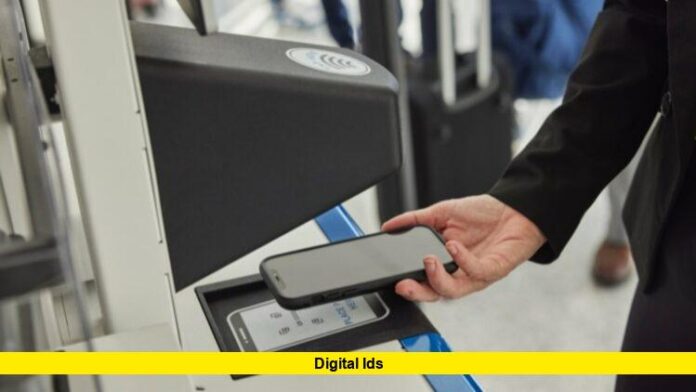
Today marks a major advancement in the realm of digital identity as Apple rolls out its new digital ID capability inside the Apple Wallet app. With the push for “digital IDs,” iPhone and Apple Watch users in the US can now store their U.S. passport information and use it at more than 250 airport checkpoints managed by the Transportation Security Administration (TSA) for domestic air travel.
What’s Happening Now
- Apple’s Digital ID allows users with a valid U.S. passport to add it to Apple Wallet by scanning the passport’s photo page and electronic chip, followed by a selfie and verification of head or facial movements.
- Once the digital ID is verified, it can be accessed from an iPhone (model 11 or later) or Apple Watch (Series 6 or later) and used at TSA checkpoints for identity verification on domestic flights.
- At the security checkpoint, the traveler holds the device near an identity reader, confirms which information will be shared, then authenticates via Face ID/Touch ID or passcode. The physical device remains in the user’s hand and is not handed over.
- The system emphasises privacy: the ID data is encrypted and stored on-device, and Apple cannot see when, where or what data is shared.
- Important limitation: this digital ID is not a replacement for a physical passport, nor is it valid for international travel or border crossings.
Why This Matters
The introduction of digital IDs at this scale is a significant step in making identity presentation more seamless and modern. With tighter ID requirements (such as those arising from the REAL ID Act) and many states still transitioning to digital driver’s licences, an option that uses the U.S. passport directly helps fill a gap.
Key benefits include:
- Convenience: No need to dig out a physical passport at the domestic airport security lane—your device can act as your ID.
- Speed: The streamlined process may help reduce hold-ups at checkpoints by moving to a contactless, device-based presentation.
- Wider access: Because it uses U.S. passports, it avoids variation among states in digital ID roll-out for driver’s licences.
- Strong security: With biometric authentication and on-device encryption, the digital ID is designed to mitigate risks of misuse.
Setup & Usage: What You Need to Know
Here’s how to get started and what to expect:
- Requirements: iPhone 11 or later, or Apple Watch Series 6 or later; the latest iOS/watchOS updates; Face ID or Touch ID enabled; an active Apple ID with two-factor authentication; a valid U.S. passport; device region set to United States.
- Setup process: In Apple Wallet, select Add → Driver’s License or ID Cards → Digital ID. Then scan the passport’s photo page and embedded chip, take a live selfie, complete verification steps, and once approved the Digital ID is added to the Wallet.
- Using at TSA: At the checkpoint press the side or home button on the device, select your Digital ID, hold near the reader, review what data is being shared, authenticate and receive the green checkmark when successful.
- What it is not: This digital ID cannot replace your physical passport when travelling internationally or at border crossings. Also, if your device is lost or you have no compatible device, you’ll still need traditional ID.
What to Be Aware Of
While the rollout is a milestone, several caveats remain:
- Only selected TSA checkpoints at participating airports currently accept this Digital ID rollout. Travelers should check ahead of time whether their departure airport supports the system.
- Because the system is new, some travellers may still encounter delays or prefer to bring their physical passport as a backup until the process becomes fully standard.
- Device loss, theft or malfunction could still complicate matters—having a physical ID in reserve remains prudent.
- Privacy concerns remain: although Apple emphasises that it cannot see when/use where the ID is presented, users should always verify what data is being shared at each presentation.
Looking Forward
Apple’s push signals an important shift toward digital identity becoming mainstream. Because physical wallets are gradually being supplemented by devices, the idea of “everything in your phone” is extending beyond payments and tickets to identity itself. Possible next-steps include:
- Expanding the Digital ID acceptance beyond TSA checkpoints to retail, hospitality, event venues or online verification.
- Incorporation of state drivers’ licences or other government-issued IDs into the same digital ecosystem.
- Further standardisation across platforms and devices so that digital IDs become as accepted as physical cards.
In Summary
The arrival of digital ID support for U.S. passports in Apple Wallet is a significant development in the field of identity verification. For domestic travellers with compatible devices and a U.S. passport, this offers a faster, safer and smarter way to navigate TSA checkpoints. Nonetheless, the system is new, limited in scope for now, and users should keep their physical documents until it becomes fully standard.
Would you consider using the digital ID option the next time you fly? Feel free to comment below with your thoughts or any concerns you might have about this shift in how we present identity.

