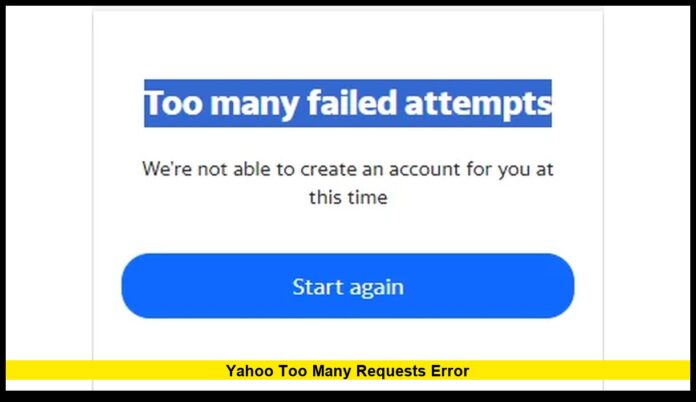
The Yahoo too many requests error is appearing more often for U.S. users trying to access Yahoo Mail, Yahoo Finance, and related services in early 2026. This message usually shows up when Yahoo’s systems detect an unusually high number of requests from the same browser, app, or IP address in a short period of time. Instead of loading normally, users may see a temporary block or a warning that access has been limited.
This is not a general Yahoo outage. It is a protective rate-limiting system designed to prevent abuse, automated traffic, and repeated login attempts. Understanding how it works can help users resolve the issue quickly and avoid it in the future.
Table of Contents
What the Yahoo Too Many Requests Error Actually Means
When Yahoo displays this message, its servers are signaling that the number of requests coming from one source has crossed a preset limit. The system responds by slowing down or blocking further activity for a short time.
In most cases, the block is temporary. Once the request rate drops and the security timer resets, normal access is restored without any action from Yahoo support.
Why the Error Happens
Several verified situations commonly trigger the Yahoo too many requests error.
Repeated Login Attempts
Entering incorrect passwords multiple times in a short window can trigger automatic security throttling. Yahoo interprets this pattern as a possible brute-force attempt and temporarily restricts access.
Frequent Page Refreshing
Rapidly refreshing Yahoo Mail or Yahoo Finance pages can create a burst of requests that exceeds allowed limits, especially on slower networks.
Third-Party Email Clients
Desktop apps such as Outlook or Thunderbird may poll Yahoo’s servers too frequently. When sync intervals are set too low, the server may block further requests.
Automated Data Fetching
Tools that pull market data from Yahoo Finance at high frequency can be rate-limited. This is common with scripts or financial tracking software that sends repeated queries.
Shared IP Addresses and VPNs
When many users appear to come from the same IP address, Yahoo may count their combined activity as excessive traffic and apply temporary restrictions.
Where Users Commonly See the Error
U.S. users most often encounter the Yahoo too many requests error in these areas:
- Yahoo Mail web login
- Yahoo Mail mobile apps
- Yahoo Finance chart and quote pages
- Email clients using IMAP or SMTP
- Automated financial tracking tools
The message may appear in different forms, but the underlying cause remains the same: request rate limits have been exceeded.
How Long the Block Usually Lasts
In most cases, the restriction clears automatically within:
- 15 minutes to 1 hour for mild overuse
- Several hours for repeated login failures
- Up to 24 hours for security-triggered lockouts
The exact duration depends on how aggressively the limit was crossed.
Proven Fixes That Work
1. Wait and Retry Later
The simplest solution is to pause activity and return after a short time. Avoid repeated refresh attempts during the cooldown period.
2. Clear Browser Cookies and Cache
Old session data can cause repeated background requests. Clearing cookies often resolves the problem instantly.
3. Use a Different Browser or Private Mode
Opening Yahoo in an incognito or private window creates a fresh session that may bypass the blocked request chain.
4. Disable VPNs and Proxies
Switching to a direct connection reduces the chance of sharing rate limits with other users.
5. Reduce Email Sync Frequency
For desktop clients:
- Increase the interval between mail checks.
- Use Yahoo’s app-specific passwords.
- Avoid constant manual refreshes.
6. Slow Down Automated Queries
If using financial tools or scripts, introduce delays between requests or switch to official data services that support higher volumes.
How to Prevent the Error in the Future
- Avoid rapid repeated login attempts.
- Do not refresh pages excessively.
- Keep email client polling intervals above 5–10 minutes.
- Use stable, non-shared IP connections.
- Log out properly instead of closing tabs during active sessions.
These habits keep request patterns within Yahoo’s acceptable limits.
Is It a Sign of a Yahoo Outage?
No. The Yahoo too many requests error is a user-level rate limit, not a system-wide failure. During true outages, users would see widespread service disruption, not isolated access throttling.
Key Points for U.S. Users
| Scenario | Why It Happens | What Fixes It |
|---|---|---|
| Can’t log into Yahoo Mail | Too many attempts too quickly | Wait, clear cookies, try later |
| Email client stops syncing | Excessive IMAP checks | Increase sync interval |
| Yahoo Finance won’t load | Rapid data requests | Slow refresh rate |
| Error appears only on VPN | Shared IP traffic | Disable VPN |
Understanding the pattern behind the error helps users avoid unnecessary frustration and account lockouts.
If you have recently encountered the Yahoo too many requests error, share your experience in the comments and stay tuned for future updates as Yahoo continues refining its security and traffic-control systems.

